
Design 3D Models with Your Fingers
Overview
The 3D modeling Design my model app is a mobile-focused tool designed for creating three-dimensional content directly on iPhone devices. Developed by Core five Inc., the software aims to simplify 3D design for users who want to craft models using intuitive touch-based interactions. It supports both wireframe and spline modeling techniques, enabling users to build detailed 3D structures with minimal input effort. The app is positioned as a free solution for individuals seeking a lightweight, accessible platform for on-the-go 3D design.
It targets hobbyists, students, and creative professionals who need a portable 3D modeling tool without the complexity of desktop-grade software. Real-world use cases include concept sketching, product prototyping, architectural visualization, and educational modeling. The interface emphasizes touch-driven control, allowing users to manipulate shapes and forms using finger gestures. While the developer did not provide additional details about advanced features or export capabilities, the app appears focused on accessibility and ease of use.
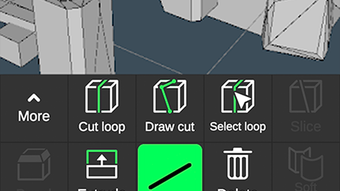
Designed specifically for iPhone, the application leverages the device’s touchscreen interface to deliver a tactile design experience. Users can select objects and apply tools such as pencil, eraser, and touch-based editing to refine their models. The ability to modify designs at any stage supports iterative workflows, making it suitable for rapid prototyping and idea development.
Key Features & Capabilities
- Touch-Based 3D Modeling: Users can create 3D models using intuitive finger gestures, enabling direct manipulation of wireframes and splines without requiring external input devices.
- Wireframe and Spline Support: The app combines two modeling techniques to allow users to build precise 3D structures from basic lines and curved paths.
- Real-Time Editing Tools: Built-in tools such as pencil and eraser allow for immediate adjustments during the modeling process, supporting fluid design iterations.
- Intuitive Interface: The design prioritizes simplicity and responsiveness, minimizing the learning curve for new users.
- On-the-Go Design: As a mobile application, it enables users to sketch and develop 3D concepts anytime, anywhere, without needing a desktop setup.
These features make the app ideal for users who need to capture ideas quickly, such as during brainstorming sessions or field visits. The ability to edit at any stage supports a non-linear creative process, allowing users to experiment freely. While export formats and file compatibility were not specified, the app appears to focus on internal model creation and visual refinement.
User Interface, Workflow & Performance
The user interface is designed around touch interaction, with tools and controls arranged for easy access on iPhone screens. Navigation relies on finger swipes, taps, and drag gestures, ensuring a responsive experience across different screen sizes. The workflow is structured to guide users from object selection to model refinement, with minimal steps between actions.
Based on the available information, the app appears optimized for smooth operation within the constraints of mobile hardware. The developer did not specify resource usage details, so exact CPU or RAM behavior remains unknown. However, the application size of 24.5 MB suggests a lightweight footprint, which may contribute to efficient performance on supported devices. Stability during prolonged use was not detailed, but the design of the interface implies a focus on reliability during active modeling sessions.
Performance observations are based on general software behavior patterns. The app likely prioritizes responsiveness over advanced rendering, which aligns with its mobile-first approach. Users can expect a consistent experience when creating and editing models, particularly for simpler designs. Complex models may impact performance, though specific thresholds were not provided.
Compatibility & System Requirements
The 3D modeling Design my model app is exclusively available for iPhone devices. It requires an iOS-compatible iPhone to function, though the exact version of iOS is not specified. The application size is 24.5 MB, indicating a compact download that fits most mobile storage configurations.
Exact system requirements were not listed. The developer did not provide details about minimum processor speed, RAM, or storage capacity. Compatibility information was partially provided, leaving users to rely on general device compatibility with iOS apps. Users should ensure their iPhone model supports the latest iOS updates to maximize functionality.
Pros and Cons
Pros
- Free to download and use, making it accessible to a broad audience.
- Designed for intuitive touch-based modeling on iPhone.
- Supports both wireframe and spline techniques for versatile design.
- Lightweight at 24.5 MB, suitable for devices with limited storage.
- Real-time editing tools enable flexible and iterative design.
Cons
- Exact system requirements and supported iOS versions were not specified.
- Advanced export or sharing options were not mentioned.
- Performance with complex models may vary without detailed technical information.
- Limited information about collaboration or cloud integration features.
- No details on update frequency or long-term development roadmap.
FAQ Section
Is 3D modeling Design my model available for free?
Yes, the app is offered as a free tool for iPhone users. There are no upfront costs for downloading or using the core features.
What devices can run this app?
The app is designed for iPhone devices. Specific compatibility with older or newer models was not provided by the developer.
Does the app require an internet connection?
The app functions as a standalone desktop application and does not require an internet connection for core modeling tasks. However, updates or cloud features may require connectivity.
Can I export my 3D models from the app?
Export functionality was not detailed in the provided information. Users should check within the app for available file formats or sharing options.
How often are updates released?
The update schedule was not specified. Users are advised to monitor the App Store for new versions and improvements.
Final Thoughts
The 3D modeling Design my model app presents a compelling option for users seeking a portable, touch-driven 3D design tool. Its focus on intuitive interaction and mobile accessibility sets it apart from traditional desktop software. While detailed technical specifications are limited, the app’s lightweight nature and free availability make it a practical choice for casual creators, students, and professionals needing quick modeling solutions on the go.
For those who value simplicity, portability, and immediate access to 3D design tools, this app offers a viable entry point into digital modeling. The combination of wireframe and spline modeling, along with real-time editing, supports a creative workflow that adapts to spontaneous idea generation.
Download 3D modeling Design my model now







